
Your business has upgraded to a faster broadband plan, but employees are still experiencing slow file transfers, video-call interruptions, delayed cloud applications, or unreliable connections. Before investing in another internet upgrade, it is worth investigating a less obvious possibility: the internal network cabling.
Broadband speed and office network performance are connected, but they are not the same thing. Your internet connection might deliver the expected speed to the router while a damaged Ethernet cable, poorly terminated connection, unsuitable network component, or overloaded network creates problems between devices and the network.
Identifying these issues can help businesses avoid unnecessary spending and make better decisions about network improvements.
This guide explains the Data Cabling Problems to Check when office internet performance falls short, how to recognise common warning signs, and when to seek assistance from qualified data cabling contractors. It also covers network cabling, structured cabling, communication cabling, and practical steps businesses can take to investigate connectivity problems.
A business network involves several connected components. These may include the broadband service, modem or router, switches, Ethernet cabling, wireless access points, network outlets, and employee devices.
A fault or limitation in any part of this arrangement can affect the user experience.
For example, a speed test performed near the router might show good results, while a desktop computer connected through an older wall outlet performs poorly. This difference suggests that the problem could be associated with the internal connection, the computer, or another part of the network path rather than the broadband service itself.
However, one speed test cannot identify the exact cause. Wi-Fi interference, router configuration, device limitations, network congestion, software issues, and problems with the internet service provider can produce similar symptoms.
The first step is to determine whether the problem affects the entire office or only particular devices, rooms, applications, or connections.
Broadband speed describes the data transfer capacity of your internet connection. Internal network speed describes how quickly devices communicate across your local network.
These are related but distinct measurements.
A business might have a high-speed broadband service but still experience slow access to a shared server because of a faulty cable, an unsuitable network interface, or a congested switch connection.
Similarly, a fast internal Ethernet connection cannot compensate for an internet service that is experiencing congestion or an outage.
Understanding this distinction helps narrow down the investigation before money is spent on new equipment.
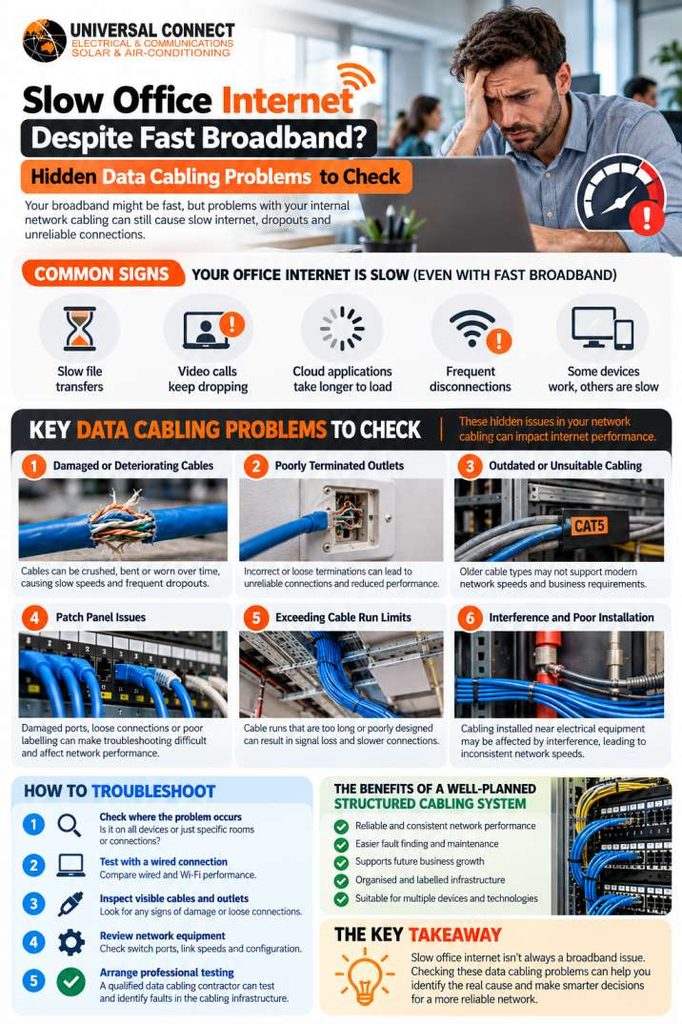
When a network performs inconsistently, inspecting the physical cabling infrastructure is a sensible part of the troubleshooting process. The following problems are worth investigating.
Ethernet cables connect computers, printers, switches, routers, access points, and other network equipment. Their condition can affect connection reliability and performance.
Cables may become damaged when furniture is moved, equipment is relocated, cable bundles are pulled too tightly, or leads are repeatedly bent. Connectors can also become worn or loose after frequent handling.
Possible warning signs include:
These symptoms do not prove that a cable is faulty, but they justify further investigation.
Start by checking accessible patch leads and confirming that connectors are securely seated. If a cable looks damaged, replace it with a suitable, known-good cable rather than continuing to use it.
For concealed or fixed cabling, arrange an assessment by an appropriately registered cabler. Avoid pulling cables out of walls or ceilings yourself.
A network cable must be terminated correctly at its connectors and wall outlets. Poor termination can affect the electrical characteristics of the connection and cause unreliable performance.
This problem can occur when new outlets are installed, an office is renovated, or existing cabling is modified without adequate testing.
A connection might appear to work normally for basic browsing but experience errors during larger file transfers or sustained network activity.
Common symptoms include intermittent connectivity, inconsistent performance, or a link negotiating at a lower speed than expected.
A qualified technician can inspect the outlet, patch panel, and relevant cable run. Appropriate cable testing can help identify wiring faults, incorrect termination, and other defects that may not be visible from the outside.
Simply replacing the router may not resolve a fault located at the wall outlet or patch panel.
Not every office needs the newest cable category. The appropriate choice depends on the required network speed, distance, installation conditions, equipment compatibility, and expected future use.
However, older or unsuitable cabling can become a limitation when a business upgrades its network equipment.
For example, a company might replace its switches and broadband equipment but retain older cable runs that have not been verified for the intended performance. The new equipment cannot necessarily deliver its full potential across an unsuitable connection.
Before replacing the entire installation, determine:
Category 6 and Category 6A Ethernet cabling are common considerations for business installations, but the correct selection should follow a technical assessment rather than a blanket recommendation.
A patch panel provides an organised termination point for network cabling. It allows individual cable runs to be connected to network switches through patch leads.
When a patch panel is poorly labelled, connections can be difficult to trace. Damaged ports, loose connections, incorrect patching, or poorly managed leads can also complicate troubleshooting.
Consider a business that relocates several employees to another part of the office. If the patch panel labels are outdated, a technician may initially connect the wrong outlet or spend unnecessary time identifying the correct cable run.
Clear labelling and consistent cable management make the infrastructure easier to maintain.
During an investigation, check whether the outlet labels correspond to the correct patch-panel ports, whether connections are secure, and whether the equipment has adequate ventilation and space.
Good organisation does not automatically improve internet speed, but it reduces avoidable errors and makes faults easier to identify.
Ethernet performance depends partly on cable type, installation quality, and distance.
For many conventional copper Ethernet channel designs, the recognised maximum is 100 metres, including the permanent link and patch leads. The applicable limit depends on the technology and cabling design, so this should not be treated as a universal rule for every network configuration.
Long or poorly designed runs may contribute to unreliable connections or prevent the intended performance from being achieved.
This can become relevant when a business adds offices, meeting rooms, warehouses, or workstations far from its existing network equipment.
A cabling assessment can determine whether the existing layout is appropriate or whether the design requires additional network distribution equipment, a different cable type, or fibre-optic links for suitable longer-distance connections.
Avoid extending Ethernet connections indefinitely with multiple inexpensive adapters or couplers without checking whether the resulting arrangement is suitable.
Network cabling must be installed with appropriate consideration for its surroundings. Electrical equipment, power cabling, and other sources of interference can affect certain installations, particularly where cable routing or separation requirements have not been followed.
If network cabling runs alongside electrical services or through challenging environments, ask an appropriately registered cabler to assess the installation.
Do not assume that interference is the cause simply because a network problem occurs near electrical equipment. Testing is needed to distinguish installation issues from congestion, hardware faults, or configuration problems.
A business network can include many individual connections between outlets, patch panels, switches, routers, access points, and end devices.
A single loose or incorrectly patched connection may affect one workstation, a group of desks, or a particular network segment.
Start by identifying the scope of the issue. If only one computer is affected, check its connection, network adapter, and relevant outlet. If several devices connected through the same switch or cable run experience similar problems, investigate the shared infrastructure.
Avoid unplugging unidentified cables in a live office network. An apparently unused lead may support a phone, printer, access point, security device, or another essential service.
Slow office internet is not always a cabling problem. Wireless connectivity deserves separate attention because Wi-Fi performance depends on factors that do not necessarily affect wired devices.
These include distance from the access point, walls and building materials, interference from nearby networks, the number of connected devices, and access-point configuration.
A simple comparison can help narrow the possibilities.
| Observation | Possible explanation | Useful next step |
|---|---|---|
| Wired computers and Wi-Fi devices are both slow | Broadband, router, congestion, or shared network issue | Test the internet connection and review network utilisation |
| Wi-Fi is slow but wired devices perform well | Wireless coverage, interference, or access-point issue | Test near the access point and review its configuration |
| One wired computer is slow | Device, patch lead, outlet, or network-port fault | Test with a known-good lead and another suitable port |
| Several devices in one area are affected | Shared cable run, switch, or local network issue | Trace and test the affected connections |
| Large file transfers fail intermittently | Cabling errors, device limitations, or congestion | Check link status and run appropriate network diagnostics |
These are troubleshooting clues, not definitive diagnoses. A structured investigation should test the relevant components rather than replace equipment based on symptoms alone.
Structured cabling provides an organised approach to connecting devices throughout a commercial building. Instead of relying on a collection of improvised cable runs, a structured installation typically uses planned cable routes, labelled outlets, termination points, patch panels, and network distribution equipment.
This approach is useful when a business needs reliable connectivity across multiple rooms, floors, workstations, or equipment areas.
A suitable structured cabling design can make it easier to:
The actual benefits depend on the quality of the design, installation, testing, and ongoing maintenance.
Structured cabling does not automatically eliminate slow internet. A poorly configured network can still perform badly even when the cabling is well organised.
When planning a new office installation, consider more than the number of computers currently in use.
The network may also need to support wireless access points, IP phones, printers, meeting-room equipment, security devices, and future workstation changes.
Discuss expected capacity, cable categories, outlet locations, network equipment, and testing requirements before installation begins.
This can reduce the need for disruptive changes when the business expands.
Commercial data cabling may need attention when a business changes its layout, adds employees, upgrades network equipment, or experiences recurring connectivity issues.
However, slow performance alone is not enough to justify a complete recabling project.
Before approving an upgrade, establish the cause of the problem and determine whether it affects individual connections or the wider installation.
Consider an office that has upgraded its switches to support faster connections. If testing shows that several existing cable runs do not meet the requirements of the intended network, replacing those runs may be justified. If the cabling tests correctly and the actual problem is an overloaded switch, a cabling replacement would be unlikely to resolve it.
A targeted investigation helps prevent unnecessary expenditure.
Arrange a review if your business experiences:
A professional assessment should explain what was tested, what was found, and which corrective actions are justified.
Communication cabling supports the physical connections used by data and telecommunications systems. Depending on the installation, this may include copper Ethernet cabling, fibre-optic cabling, network outlets, and associated termination hardware.
The term low voltage cabling is also used in the industry, but it can refer to different systems depending on the context. It should not be assumed that all low-voltage installations are interchangeable or subject to identical requirements.
When planning a communication installation, confirm the intended purpose of each cable, the equipment it will connect, and the relevant installation rules.
For example, an office may need network outlets for desktop computers, structured connections for wireless access points, and fibre links between network distribution areas. Each requirement should be assessed according to the intended use and applicable technical constraints.
When basic checks do not resolve the issue, qualified data cabling contractors can help investigate the physical network infrastructure.
The exact scope of an assessment will vary, but a systematic process may include the following steps.
Record which devices are affected, when the problem occurs, and whether the issue involves internet access, local file transfers, video calls, or all network activity.
This helps distinguish a widespread performance problem from a fault affecting a specific connection.
Identify relevant outlets, patch panels, switches, routers, and cable routes. Existing documentation can help, but it should be checked against the actual installation.
If labels are missing or incorrect, tracing the affected connections may be necessary.
Depending on the suspected fault, testing may identify wiring errors, cable damage, poor termination, or performance limitations.
A basic continuity check and a more comprehensive cable certification test are not the same. The appropriate test depends on the question being investigated.
Where a business needs evidence that a new or upgraded installation meets a specified cabling category, ask what testing and documentation will be provided.
A cabling issue should not be assumed without evidence. The assessment may also need to consider switch-port status, link speed, network adapters, patch leads, and other relevant equipment.
Where necessary, the business’s IT provider or network administrator may need to investigate configuration, congestion, or application-related problems.
A useful report should identify the affected connections, the tests performed, any limitations, and recommended corrective actions.
Where repair or replacement is proposed, ask why the work is necessary and whether a targeted repair would be sufficient.
This approach gives the business a clearer basis for deciding what to fix first.
A new router or faster broadband plan may not solve a fault in a wall outlet, patch lead, or fixed cable run.
Compare wired and wireless performance and identify where the slowdown occurs before committing to an upgrade.
Poor performance can have several causes. Replacing cables without testing may add cost without resolving the problem.
Confirm the fault and its location before deciding on corrective work.
A connection that works most of the time can still disrupt cloud applications, voice calls, and file transfers.
Record when the issue occurs and which devices are affected. Intermittent problems can be harder to diagnose when no useful information is available.
Choose patch leads and fixed cabling that are appropriate for the installation and intended performance. Avoid treating all Ethernet cables as equivalent simply because their connectors look similar.
Unlabelled outlets and patch panels make future troubleshooting more difficult. Maintain an accurate record of network connections when changes are made.
Do not cut into concealed cables, modify fixed communications wiring, or work near electrical services without appropriate competence and authorisation.
Use an appropriately registered cabler for regulated cabling work and follow applicable installation requirements.
Use this checklist to gather useful information before arranging an investigation.
These steps can help the person investigating the network understand the symptoms more quickly. They do not replace professional testing where a physical cabling fault is suspected.
Slow office internet does not always mean your broadband plan is inadequate. Damaged Ethernet cables, poor terminations, unsuitable cable runs, patch-panel issues, and other physical network faults can affect reliability and performance. Wi-Fi, network equipment, congestion, and service-provider problems must also be considered.
The most effective approach is to identify where the slowdown occurs, test the relevant connections, and use the results to guide any repair or upgrade.
For Universal Connect Pty Ltd, this topic provides an opportunity to help businesses understand the role of reliable network infrastructure without overstating what cabling alone can achieve. Businesses considering an installation or troubleshooting project should confirm the scope of work, applicable registration requirements, testing arrangements, and documentation before proceeding.
A well-planned and properly tested network gives businesses a clearer foundation for reliable connectivity today and more informed decisions about future upgrades.
Yes. Faulty or unsuitable cabling can affect the connection between network devices and may cause errors, reduced link performance, or intermittent disconnections. However, slow broadband can also result from Wi-Fi interference, congestion, equipment limitations, or an internet service issue.
Compare wired and wireless connections, test more than one device where possible, and investigate the affected part of the network before assuming that cabling is responsible.
An IT technician is often the appropriate starting point for problems involving device settings, router configuration, software, or network management. A registered cabler is appropriate when the issue involves fixed communications cabling, outlets, terminations, or new cabling installation.
Some faults require both types of expertise. For example, an IT technician may identify a workstation connection that negotiates at an unexpected speed, while a cabler tests the associated fixed cable run. Coordinating the investigation can help avoid unnecessary equipment replacements.
Structured cabling can provide a more organised and maintainable physical network, and it can support the intended performance when correctly designed, installed, and tested. It does not automatically make an internet connection faster.
The benefit depends on the existing infrastructure and the cause of the problem. If the current cable runs already meet the requirements of the network, replacing them may not improve performance. Testing helps establish whether an upgrade is necessary.
Consider an upgrade when testing identifies cabling that is unsuitable for the required performance, recurring physical faults, inadequate infrastructure for new equipment, or limitations caused by an outdated installation.
A planned office expansion or network upgrade is also a useful time to review the cabling design. Before replacing existing infrastructure, confirm the intended speed, cable category, distances, equipment compatibility, and expected future needs.
Ask whether the contractor has the appropriate registration for the work, what the assessment includes, and which tests will be performed. Confirm whether the quote covers investigation, repairs, replacement materials, and documentation.
You should also ask how existing connections will be identified, whether business operations may be interrupted, and what written records will be supplied after the work. Clear answers help you compare proposals based on scope and technical value rather than price alone.