Moving offices is exciting until Monday morning comes and nobody can log in. The desks are in place and the coffee machine works, but the network is down. We see this when businesses bring in data cabling contractors too late and expect cabling to fall into place in the final week.
Your network is the backbone of the new office. Phones, laptops, printers, Wi-Fi, security cameras and access control all rely on well-planned structured cabling. If you get it right, staff plug in and start working. If you get it wrong, you lose productivity, money and patience.
At Universal Connect Pty Ltd, we plan relocations for businesses of every size. Whether you run a small professional practice or a busy multi-floor workplace, commercial data cabling needs a clear plan and enough lead time.
This office relocation data cabling checklist gives you that plan. It breaks the move into weekly steps, starting eight weeks before move day, so every cable, port and connection is ready when your team walks in.
Most businesses plan the move around furniture, fit-out and removalists. Cabling often gets one line on the project plan. That is a risky gap, because cabling depends on things you don’t control, such as building access, carrier timelines and fit-out progress.
Here is a common scenario. A 60-person accounting firm signs a lease and books removalists. Their fit-out team finishes the walls and ceilings, and only then does anyone ask about cabling. The installers now have to work around new plasterboard and finished ceilings. The carrier service isn’t ready either, because no one lodged the order early. Staff work from home while the business pays rent on an office it can’t use.
Starting eight weeks out avoids this. It gives you time to survey the site, order services, install and test cabling, and fix problems before move day.
Start with a site survey of the new premises. A qualified cabler walks the space, checks ceiling and floor access, finds existing cabling and spots risks early. Bring your floor plan and furniture layout to this meeting.
At the same time, audit your current office. List every device that needs a network connection, including desks, printers, wireless access points, cameras, door readers and meeting room screens. This list becomes your port count.
Contact your internet and phone providers now. Carrier lead time is the most common cause of relocation delays, because new connections can need site visits, approvals or building works. Ask each provider for a confirmed installation date and get it in writing.
Also confirm where the carrier service enters the building. Your cabling design needs to connect that entry point to your comms room.
Now your cabler designs the network. A good structured cabling design maps every outlet, cable route and termination point. It allows for future growth, so you don’t need to recable when you hire more staff.
We usually suggest adding spare outlets in meeting rooms, open-plan areas and near printers. Running an extra cable during installation costs far less than adding one after the ceilings close.
The comms room houses your racks, switches, servers and patch panel. Check that it has enough space, dedicated power, good airflow and secure access. Equipment generates heat, so ventilation or cooling matters. Plan rack layout, cable management and backup power before installation starts.
Installation runs best when it fits around the fit-out schedule. Cablers ideally work after the walls go up but before ceilings and finishes close. Coordinate closely with your builder or fit-out manager here. Cables run from each outlet back to the patch panel in the comms room.
Never skip cable certification. A certified tester checks each cable run against the relevant performance standard. It finds faults such as poor terminations, damaged cable or runs that are too long. Ask for the certification report and keep it with your building records.
Label every outlet and patch panel port with a clear, matching system. Update your floor plan with outlet numbers. Then plan the cutover: decide which devices move first, who patches them in, and how you will test each workstation.
Install switches and patch connections in the comms room. Test the internet service, Wi-Fi and phones before staff arrive. On move day, keep a technician on site to fix any connection issues quickly.
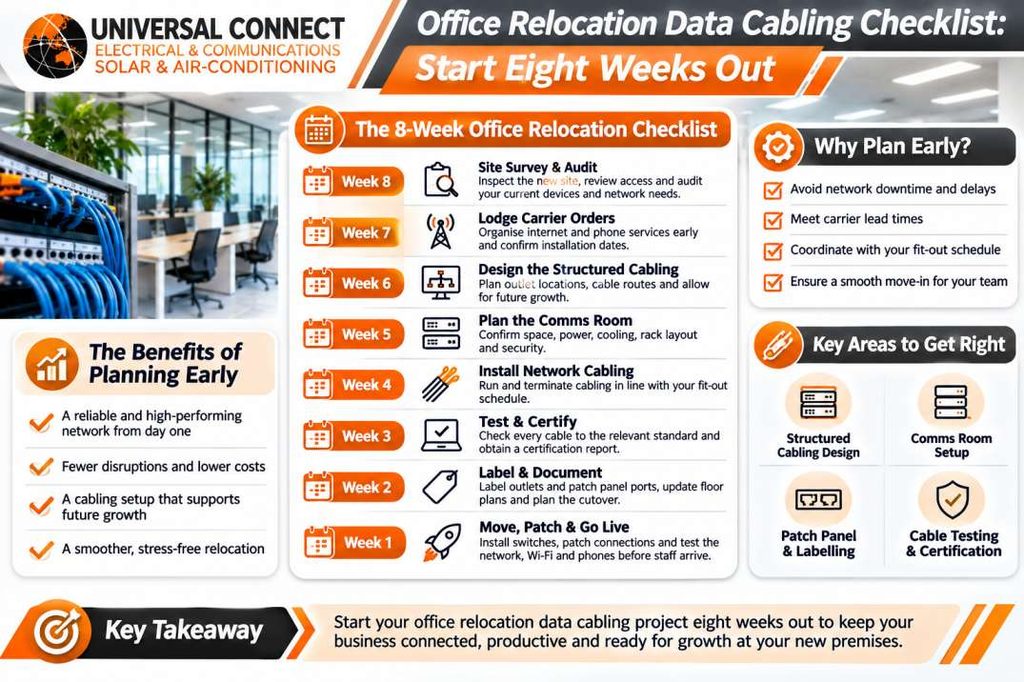
| Week | Key Task | Main Outcome |
|---|---|---|
| 8 | Site survey and device audit | Clear port count and site risks |
| 7 | Carrier orders | Confirmed service installation date |
| 6 | Cabling design | Outlet map and cable routes |
| 5 | Comms room planning | Power, cooling and rack layout |
| 4 | Installation | Cables run and terminated |
| 3 | Testing and certification | Verified cable performance |
| 2 | Labelling and documentation | Easy future maintenance |
| 1 | Patching and go-live | Network ready for staff |
A move is the perfect time to upgrade. Old cabling often limits speed and reliability, and moving it rarely makes sense.
| Cable Type | Best For | Notes |
|---|---|---|
| Cat6 | Standard office desks and devices | Reliable for most everyday business needs |
| Cat6A | High-demand offices and Wi-Fi access points | Better performance and future-proofing |
| Fibre | Backbone links between floors or buildings | High capacity over longer distances |
Experienced data cabling contractors match cable choice to your business, not to a generic template. A design studio moving large files needs a different setup from a small consulting office.
A successful office move depends on a network that works from the first hour. Bringing in data cabling contractors early gives you time to plan, install, test and fix issues before your team arrives.
Follow this office relocation data cabling checklist from eight weeks out. Survey the site, order carrier services early, design properly, certify every cable and document everything.
Well-designed structured cabling supports your business for years, not just for move day.
If you’re planning a relocation, talk to Universal Connect Pty Ltd about your commercial data cabling needs. Our team can help you build a clear plan for your new office.
Eight weeks gives you room to handle the steps you don’t fully control. Carrier connections, building approvals and fit-out schedules can all shift. Starting early lets your cabler survey the site, design the network, install cable at the right stage of the fit-out and test everything properly. It also leaves a buffer for surprises. Experienced data cabling contractors use this time to fix problems before move day, not after your staff arrive.
A qualified cabler inspects the new premises to understand how cables can run through the space. They check ceiling and floor access, existing cabling, the carrier entry point and the proposed comms room location. They also review your floor plan and furniture layout to place outlets in the right spots. The survey highlights risks such as asbestos registers, limited ceiling space or tricky building access, so you can plan around them early.
In most cases, reusing old cable is a poor choice. Cable removed from ceilings and walls often gets damaged, kinked or cut too short for the new layout. Older cable may also fall below the standard your current equipment needs. New, properly installed structured cabling costs more upfront but gives you reliable performance, valid certification and room to grow. Your switches and patch leads can often move with you if they still suit your needs.
Cable certification uses a specialised tester to check every cable run against the relevant performance standard. It measures factors such as signal loss, interference and cable length. A cable can pass a simple connection test and still underperform under real network load. Certification proves the installation works as designed and gives you documented evidence for each run. Always ask for the full certification report and keep it with your building and IT records.
Choose a secure, dedicated space with enough room for racks and future equipment. Make sure it has dedicated power circuits and good ventilation or cooling, because switches and servers produce heat. Plan rack layout, cable management and backup power before installation begins. Keep the room clear of storage and cleaning supplies. A well-planned comms room makes your commercial data cabling easier to maintain, troubleshoot and expand as your business grows.